




Technical details:
Data update: 07.2026 - 2.71
Size: 1 Gb
Region: All regions
Type: Diagnostic Tool
Language: English, Dutch, Spanish, Italian, German, French, Persian, Finnish, Russian, Thai, Turkish, Zwedish, Chinese, Czech, Japanese, Korean, Polish, Portuguese
OS: Vista, Win 7, Win 8, Win 10
Instructions: Present
Installation: 1 PC
Version: 07.2026 - 2.71
High speed download link:
Scania SDP3 2.71 + XCOM 2.54 is a complete dealer-level diagnostic package for Scania trucks, buses, and Scania industrial and marine engines. Together, these two programs cover everything from everyday troubleshooting and calibration to advanced ECU functions.
Scania SDP3 2.71
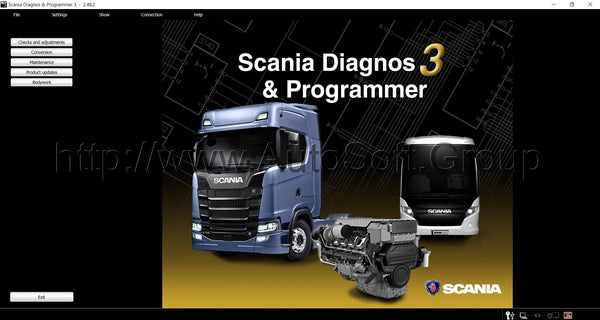
Scania Diagnos & Programmer 3 (SDP3) communicates with Scania vehicles and Scania industrial and marine engines over the CAN network. The diagnostic software handles troubleshooting, adjusting customer-preferred parameters, performing calibrations, applying upgrades to the electrical system, and updating control-unit and engine software. To connect, you need a Scania VCI2 or VCI3 adapter.
SDP3 contains a wealth of information you need during the operation and repair of Scania vehicles. With this diagnostic program you can run dealer-level procedures: work with fault codes, calibrate and change the parameters of electronic systems, test mechanisms, poll control units, update software, and reset service intervals. SDP3 is suitable for trucks and buses as well as Scania industrial and marine engines.
Supported systems for VCI2 adapter:
APS - air handling
ATA, WTA, CTS and AUS - additional heating, timer, radio
BCS - bus chassis
BWS - bodies
EBS - brake adjustments
EEC - Reducing Emissions
EMS engine management
COO - coordinator
LAS and BBS - closures and alarms
ICL - instrument panel
TCO - tachograph
OPC and RET - gearbox regulation
RTI - traffic information
SMS - suspension control
TPM - Systematic Tire Pressure Monitoring
LDW - Lane Change Alert.
Supported Systems for VCI3 Adapter:
The device is designed to work with vehicles with a production date after 2004.
Heating and air conditioning system in the car;
Compressed air preparation system;
Automatic transmission
Fuel;
Running trucks and buses;
Brakes;
Air suspension;
Engine;
Coordinator;
Dashboard;
Tachograph;
Security alarm;
Alert system;
Lane departure warning system;
A system that monitors tire pressure.
Scania SDP3 software is an excellent tool with powerful functionality (VCI 3).
With such a diagnostic complex, you can carry out dealer-level diagnostic procedures:
work with errors, calibrate and change the parameters of electronic systems, test mechanisms, poll blocks, update software, and also reset service intervals
XCOM 2.54
Scania XCOM is a diagnostic tool for the diagnosis and maintenance of Scania trucks, heavy vehicles or heavy-duty engines. XCOM lets you read, save, and modify data — DTC trouble codes, parameters, statistics, and more — from the supported ECUs on Scania trucks. It is compatible with both Scania VCI2 and the latest VCI3 diagnostic devices (full CAN protocol support, so there are no compatibility issues).
Beyond standard functions, XCOM offers advanced features: turning the SCR catalytic system on or off (so the Selective Catalytic system stops consuming DEF), disabling EGR (Exhaust Gas Recirculation) or the immobilizer, and — for advanced users — ECU recovery, reset, and unlocking without a PIN code. The XCOM Access Level utility switches between XCOM High, XCOM Industry & Marine, and XCOM Internal. The software ships with a USB HASP license key and requires a PC and a Scania VCI2 or VCI3 interface.
Scania XCOM supported ECU
- Engine management system (EMS)
- Gearbox management system (GMS)
- Retarder system (RET)
- All wheel drive system (AWD)
- Clutch Control (CLS)
- Exhaust Emission Control (EEC)
- Coordinator (COO – COO7)
- Bodywork system (BWS – BCI1)
Scania XCOM supported DTC
- EMS (S6, S7, S8)
- GMS (OPC4, OPC5)
- RET (RET1, RET2)
- AWD (AWD1)
- EEC (SCR1, EEC3)
- COO (COO6, COO7)
- HMS (HMS1)
Other Scania XCOM functions
- SCR turning ON/OFF
- EGR turning ON/OFF
- Immobilizer Enable/Disable
- Truck power increase
- ECU recovery
- ECU reset
- ECU unlock without PIN
Quick start: connecting in XCOM
Start the XCOM application, then connect to CAN via File → Connect to CAN, the F4 key, or Shift+F4. The "Select ECUs" dialog lets the user either scan for all ECUs on CAN (a functional SetSession KWP command) or scan only the checked ECUs (a physical SetSession KWP command to the marked CAN addresses). If more than one VCI is connected, the user can choose which VCI to use (the VCI ID is printed on the back of the unit). The application then connects to CAN via KWP; if it detects an ECU with invalid configuration, it will ask whether to correct it. Once complete, the connected ECUs are displayed in the ECUs menu and ECU explorer tree.
Why choose AutoSoft.group
- Online Support 24/7 — watch the program online before you buy
- Same-day remote installation
- A wide selection of professional diagnostic software
Buy Scania SDP3 2.71 + XCOM 2.54 for $135. Questions? Contact us on WhatsApp or by e-mail.
Scania Diagnostic Software | Heavy Duty Truck Tools | SDP3 XCOM Software | Diesel Repair Equipment | Scania Programming Tool | Scania Service Programming